SPIDer Assessment by SPID 한국어 Request a trial

ASPICE 3.1 · 4.0  /  VDA PoA

An assessment, end to end,
with no internet.

Setup, evidence, findings, process attribute ratings, rule checks and the report — all inside one tool. Your customer's material never leaves this PC.

Docker Desktop required · Windows 10/11 · 8GB RAM recommended · 638MB
Request → download → install → send us the installation code and we return a 15-day trial key

Offline by design

Your customer's material
never leaves this PC

An assessment handles the customer's design documents, test results and process records. For a tier-one supplier, sending that to an outside server is rarely something you can negotiate.

SPIDer Assessment runs entirely on the assessor's PC. Nothing goes out during installation, during the assessment, or when the report is produced. The database and the knowledge base ship inside the package.

AI helps with a draft. It does not rate.

With no AI configured, the tool stops rather than inventing a plausible sentence. An assessment report is a document you have to defend later. Nothing the tool quietly made up belongs in it.

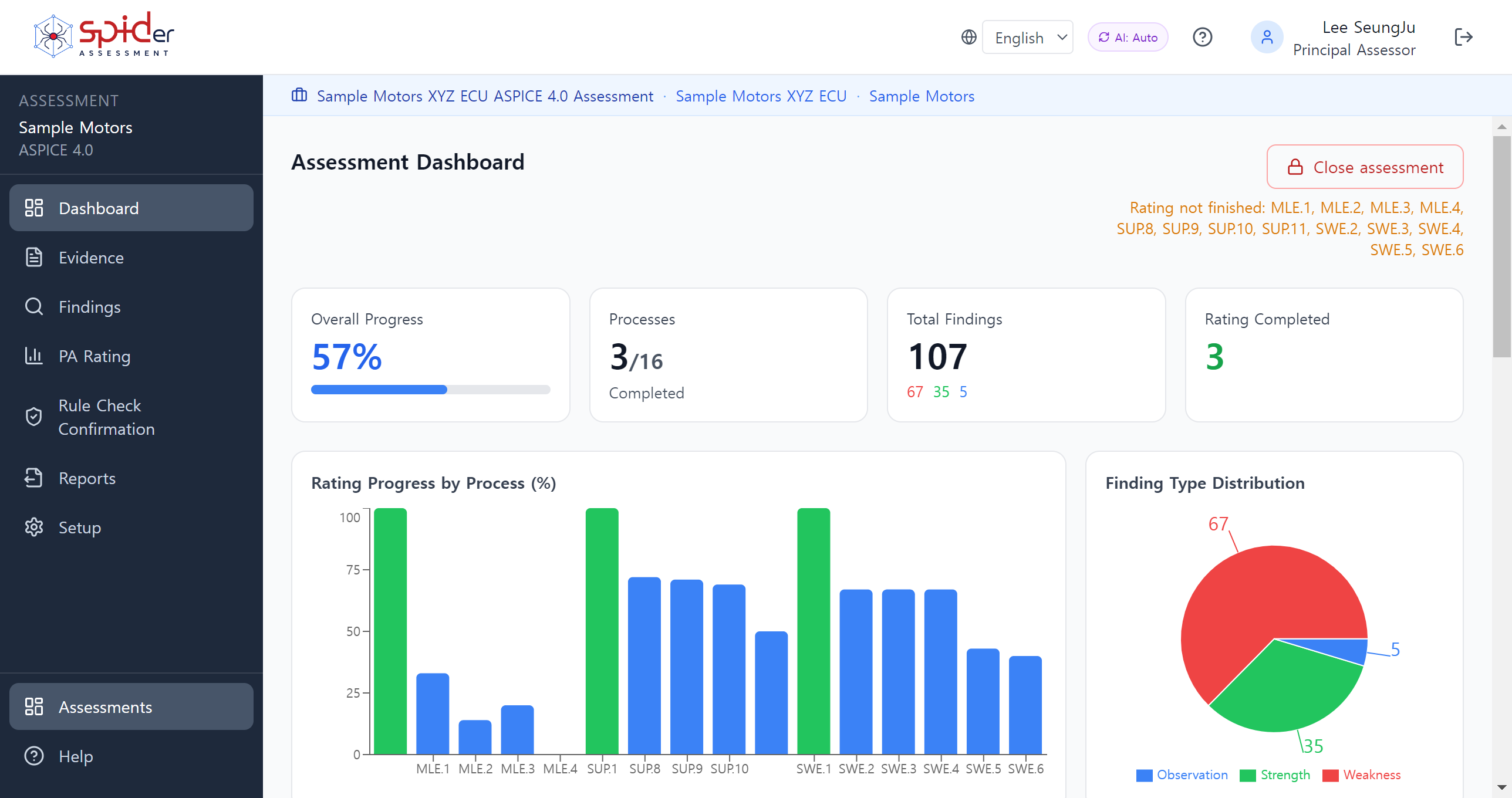
Assessment dashboard. Progress and finding distribution for each process.
Dashboard — progress and findings for each process

Who it is for

Which one are you

Freelance

Freelance lead assessor

You lead assessments alone, and a good share of the time goes on moving between several spreadsheets and a Word document to keep evidence and ratings in step.

This tool removes that round trip. You rate where you record the evidence, and the ratings go straight into the report. Co-assessors can be invited without a seat limit.
Consultancy

Consultancies and certification bodies

Several lead assessors, several assessments running at once. Assign processes per assessor and anything outside their scope is read-only. Only a lead assessor can finalise and produce the report.

When an assessment closes, the team and their qualifications are kept as they were on the day. People change later; the record does not.

In-house

Gap analysis and readiness checks

No intacs qualification needed. There is an informal assessment mode for organisations that want to see where their own processes stand before a customer assessment.

An informal assessment is not submitted to intacs, so no assessment log is produced and the report cover states that it is not a certified assessment. The tool does not blur that line.

Where the work happens

Rate it where you
write the evidence

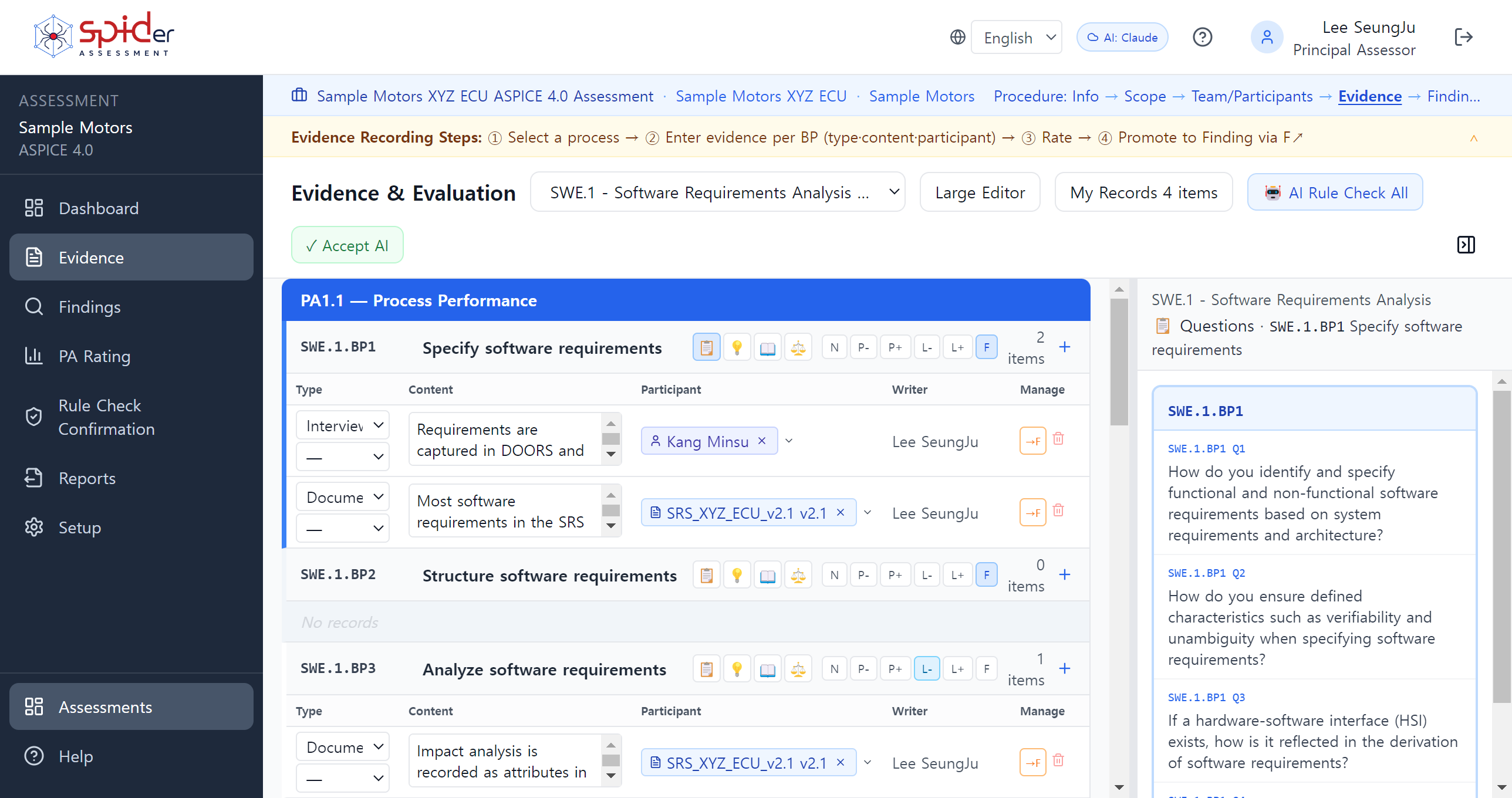
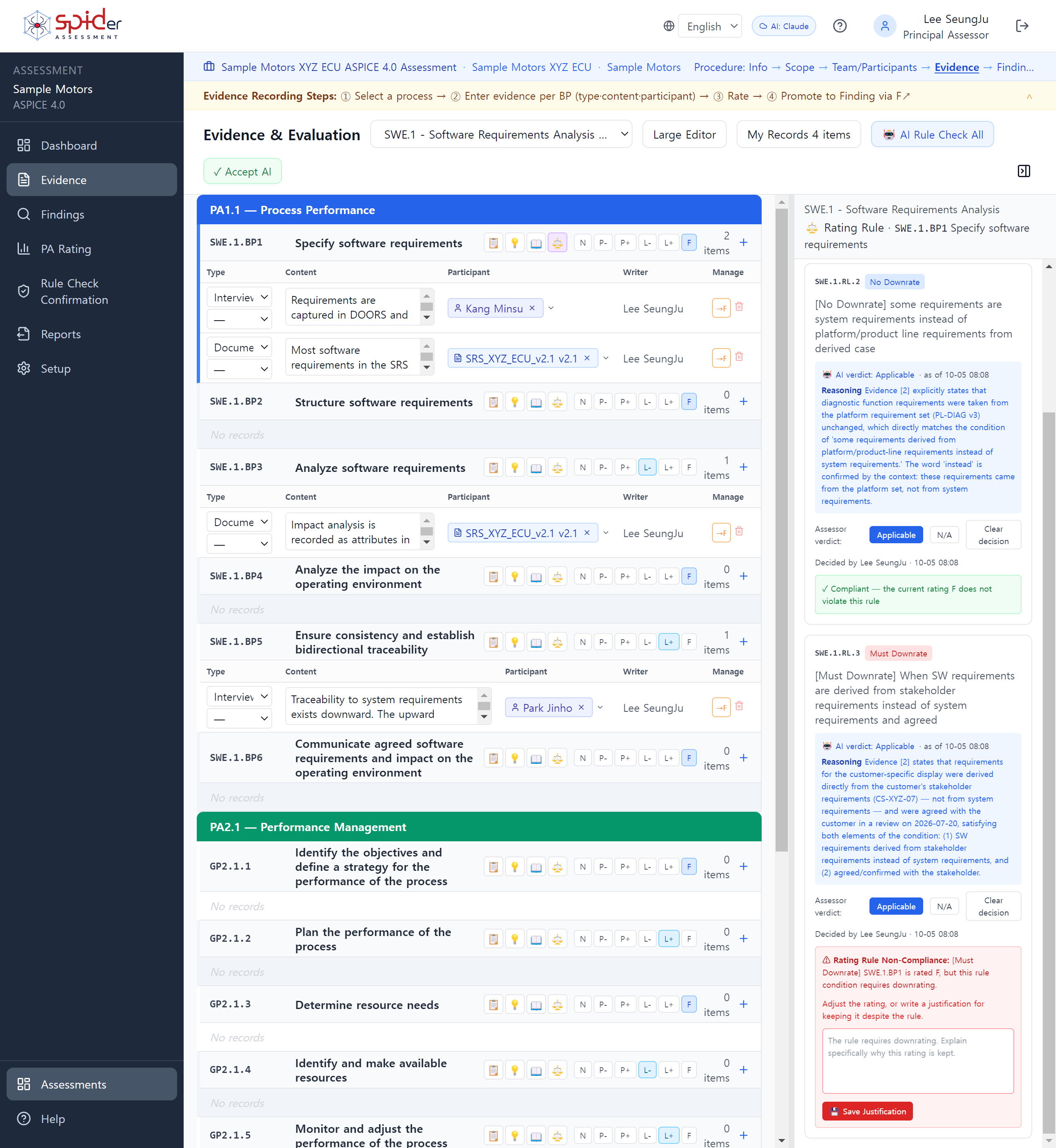
Record evidence per base practice and set the rating on the same row. No moving between a spreadsheet and a document to reconcile them later.

The right-hand panel carries the questions to ask for that practice, example findings, the guideline text and the rules that apply. You do not go looking through another document mid-interview.

Evidence links to participants and documents, and their names and versions are kept as they were when it was recorded. Master data can change afterwards; the assessment record does not.

Evidence screen. Evidence field and rating buttons on one row, with the question panel on the right.
Evidence — the note, the participant and the rating on one row

Rating Rules

It shows where a rating
conflicts with a rule

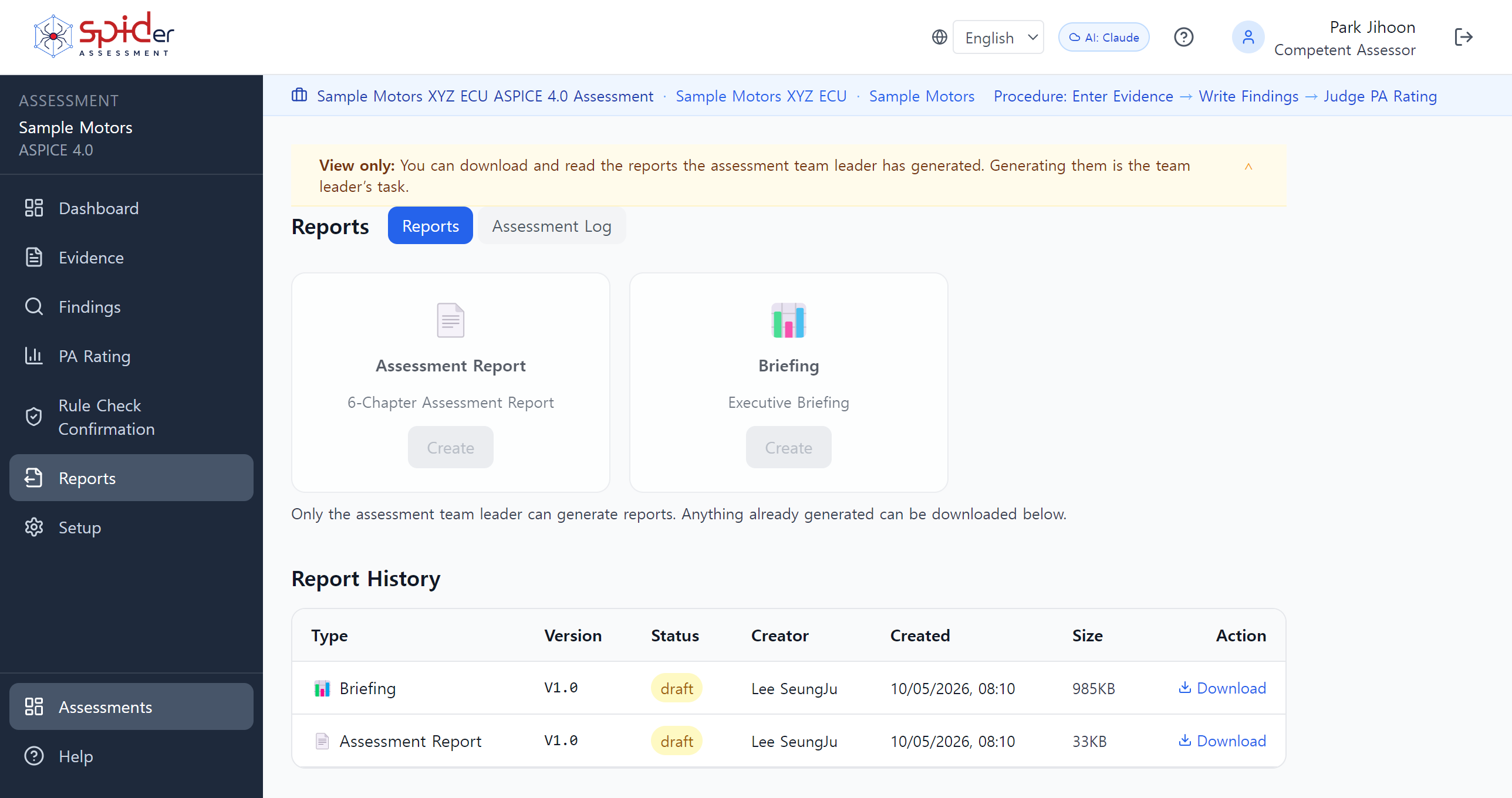
The ASPICE 4.0 Rating Rules are checked automatically. When a rating you gave conflicts with a rule, you are told on the spot.

There is no switch to turn a rule off. The tool cannot change what the standard sets. If you judge that a rule does not apply, either adjust the rating or leave it and write the reasoning. That reasoning goes into the report as written.

Rule Check appears on ASPICE 4.0 assessments only. Applying the rules is not mandatory under 3.1, and the tool draws that line by model version.

Rule check panel. The violation and the rationale field appear on the right.
When a rule is broken you write the reasoning there — the sentence you will defend later starts here

What it produces

Look at the output
first

Assessors do not judge a tool by its feature list. They ask whether they can hand its report to a customer under their own name.

So the samples are open. No request needed. They were produced from invented data for a company that does not exist.

Korean, English and Chinese. The screens and the manual match.

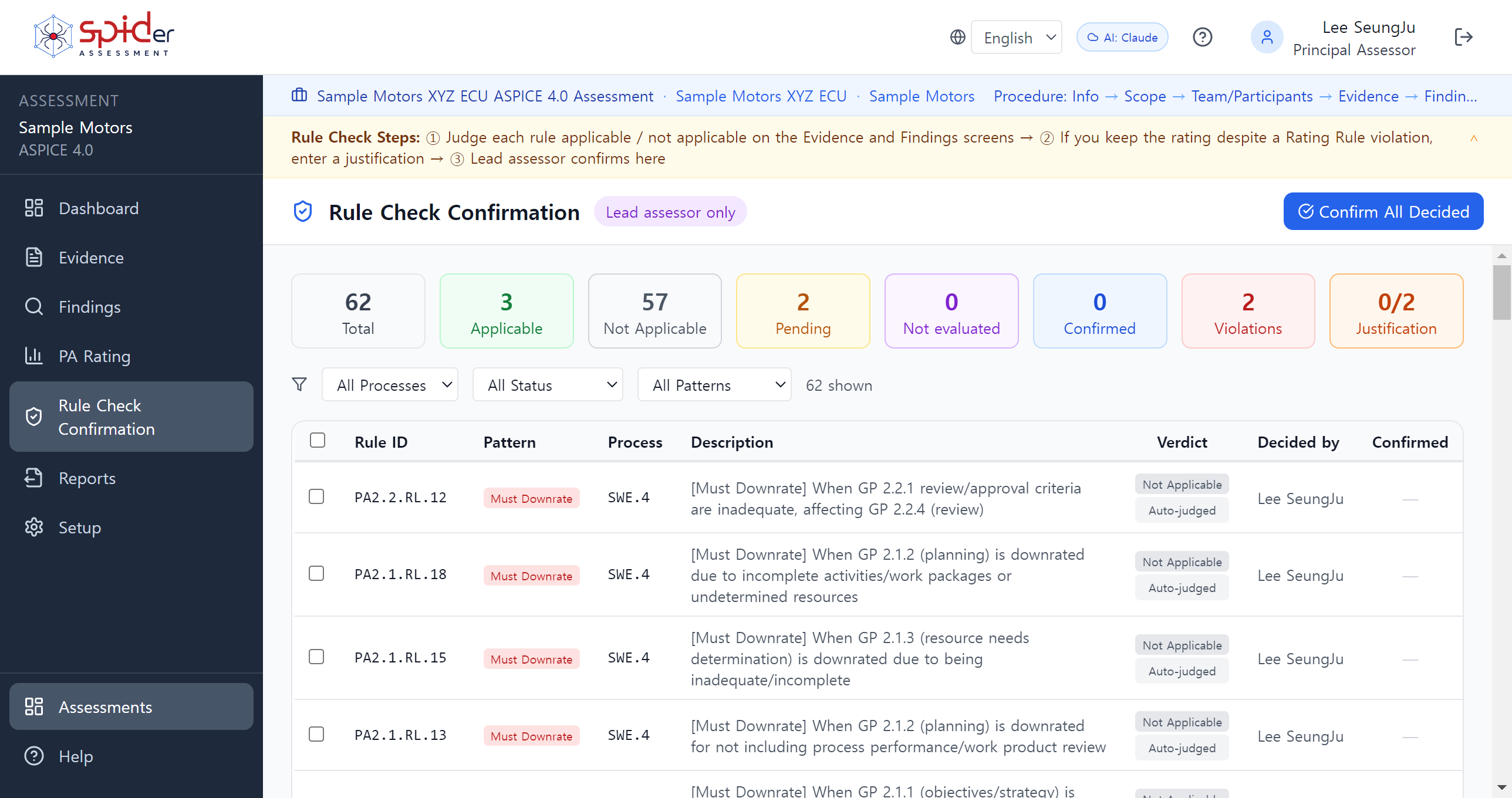
Report screen showing the generation history and finalised state.
Reports — the generation history and the finalised state are kept

On the record

The facts

Standards
Automotive SPICE 3.1 · 4.0
VDA Potential Analysis (PoA)
Cybersecurity PAM (CS PAM)
Rule Check
Every ASPICE 4.0 Rating Rule, checked automatically. There is no switch to turn a rule off — the tool cannot change what the standard sets. A rule you judge inapplicable is answered by writing a justification against the violation, and that justification goes into the report as written.
Languages
Korean · English · 中文 — screens, manual and reports
VDA
Written approval for commercial use from the VDA QMC (2026-06-15)
Development
Built in-house at SPID. An intacs certified Principal Assessor worked on the design directly

Founded in 2007, SPID provides process improvement and engineering consulting — including Automotive SPICE and CMMI assessment and consulting — along with the supply of related solutions and training through SPID Academy.

SPIDer Assessment came out of that work. An intacs certified Principal Assessor who runs assessments designed it. The screens follow the order an assessment actually takes, so the tool does the moving between spreadsheets and documents that used to be done by hand.

Product enquiries and technical support are handled by SPID directly.

SPID Co., Ltd.
Rule check dashboard. Every rule checked, the violation found.
Rule Check — every rule checked, the violations pointed out. The judgement stays with the assessor

Pricing

Pricing

Annual subscription only. 20% off when three years are paid up front.

Personal USD 1,500 / year
  • One lead assessor
  • Co-assessors without a seat limit
  • ASPICE 3.1 · 4.0 · VDA PoA
  • Informal assessment (gap analysis) included
  • Knowledge base updates included
Business USD 3,000~ / year · 2, 3 or 5 lead assessors
  • 2 leads USD 3,000 · 3 leads USD 3,500 · 5 leads USD 4,000
  • Everything in Personal
  • Processes assigned per assessor
  • Read-only outside the assigned scope
  • Administrator account and user management
6 or more On request / please ask
  • Priced to the team you have
  • Roll-out support can be arranged

Before you decide

  • Docker Desktop is required (free)
  • Windows 10/11 · 8GB RAM recommended · 5GB free disk
  • Installer is 638MB
  • A licence is bound to the PC it was installed on. Moving to another PC goes through a surrender and re-issue

Knowledge base updates included

The ASPICE PAM is revised and the Rating Rules follow. An assessment built on superseded rules becomes a finding in its own right. Updates arrive for as long as the subscription runs.

Try it

Request a trial

We send the download link to the address you give us. The link is valid for seven days.

When the installation finishes, the screen shows an installation code. Send that back and we return a 15-day trial key. We reply within two business days.

If you get stuck during installation, just reply. SPID answers directly.

The installation guide is available without a request. It covers Docker, the install, the first sign-in and licence activation, screen by screen.

Docker Desktop required · Windows 10/11 · 8GB RAM recommended · 638MB
Request → download → install → send us the installation code and we return a 15-day trial key

Your role

Pressing [Send request] opens a mail window with your answers already filled in — just send it. If you have no mail client, write to spid@espid.com directly.
What you send is used only to arrange the trial and answer your questions. We do not make sales calls.

Questions

Frequently asked

Does it really work with no internet

It does. Installation, the assessment and report generation involve no outside traffic. The one exception is the AI drafting aid. You do not need it to run an assessment, and if it is not configured the tool says so on screen.

Why does the licence key have to be issued separately

Because a licence is bound to the PC it was installed on. We need that PC's installation code to make a key that works only there. A trial follows the same route.

The installation code carries no personal data and nothing from your assessments.

I have never used Docker

Install Docker Desktop and run install.bat. That is the whole of it. The installation guide covers it screen by screen. If you get stuck, just reply.

Will the tool force a rating on me

The tool does not rate. It reports a Rating Rule violation; the judgement is yours. If you decide a rule does not apply, write the justification and it stays in the report.

What happens when I change PC

There is a surrender procedure. Surrender on the old PC, send us the proof, and we re-issue a key for the new one. It is what stops one licence running on two machines.

Can several people work on the same assessment

Yes. There is no seat limit on co-assessors. Assign processes and anything outside that scope is read-only. Only a lead assessor can finalise and produce the report.

Does it handle PoA

It does. VDA Potential Analysis has its own screens. A PoA is not a formal assessment, so it carries no Class and no intacs log, and the tool keeps that distinction.